Assembling data
What constitutes a good assembly?
How to estimate assembly quality
Co-assembly
Assembly and Co-assembly
 Learning Objectives - in the following exercises you will
learn how to perform a metagenomic assembly and to start some basic
analysis of the output. Subsequently, we will demonstrate the
application of co-assembly. Note, due to the complexity of metagenomics
assembly, we will only be investigating very simple example datasets as
these often take days of CPU time and 100s of GB of memory. Thus, do not
think that there is an issue with the assemblies.
Learning Objectives - in the following exercises you will
learn how to perform a metagenomic assembly and to start some basic
analysis of the output. Subsequently, we will demonstrate the
application of co-assembly. Note, due to the complexity of metagenomics
assembly, we will only be investigating very simple example datasets as
these often take days of CPU time and 100s of GB of memory. Thus, do not
think that there is an issue with the assemblies.
Once you have quality filtered your sequencing reads, you may want to perform de novo assembly in addition to, or as an alternative to a read-based analyses. The first step is to assemble your sequences into contigs. There are many tools available for this, such as MetaVelvet, metaSPAdes, IDBA-UD, MEGAHIT. We generally use metaSPAdes, as in most cases it yields the best contig size statistics (i.e. more continguous assembly) and has been shown to be able to capture high degrees of community diversity (Vollmers, et al. PLOS One 2017). However, you should consider the pros and cons of different assemblers, which not only includes the accuracy of the assembly, but also their computational overhead. Compare these factors to what you have available. For example, very diverse samples with a lot of sequence data uses a lot of memory with SPAdes. In the following practicals we will demonstrate the use of metaSPAdes on a small sample and the use of MEGAHIT for performing co-assembly.
Let’s first change to the working directory where we will be running the analyses:
cd /home/training/Assembly/
To run metaspades you would execute the following commands (but don’t run it now!):
mkdir assembly
metaspades.py -t 4 --only-assembler -m 10 -1 reads/oral_human_example_1_splitaa_kneaddata_paired_1.fastq -2 reads/oral_human_example_1_splitaa_kneaddata_paired_2.fastq -o spades_out
 Since the assembly process would take ~1h we are just going to analyse the output present in “assembly.bak”. Let’s look at the “contigs.fasta” file.
For this, take the first 40 lines of the sequence and perform a blast search at NCBI (https://blast.ncbi.nlm.nih.gov/Blast.cgi, choose Nucleotide:Nucleotide from the set of options). Leave all other options as default on the search page. To select the first 40 lines of the assembly perform the following:
head -41 assembly.bak/contigs.fasta
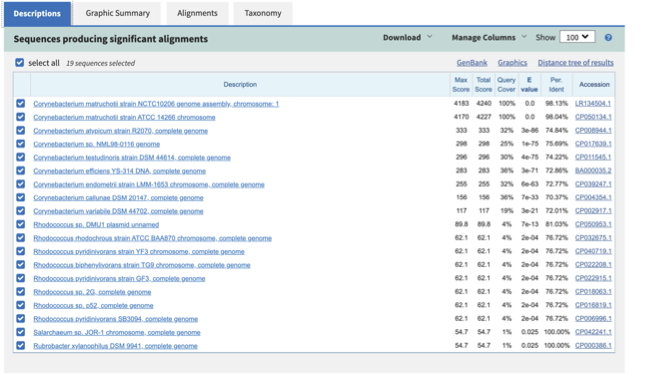
 Which species do you think this sequence may be coming from?
Does this make sense as a human oral bacteria? Are you surprised by this
result at all?
Which species do you think this sequence may be coming from?
Does this make sense as a human oral bacteria? Are you surprised by this
result at all?
Now let us consider some statistics about the entire assembly
assembly_stats assembly.bak/scaffolds.fasta
This will output two simple tables in JSON format, but it is
fairly simple to read. There is a section that corresponds to the
scaffolds in the assembly and a section that corresponds to the contigs.
What is the length of longest and shortest contigs?
What is the N50 of the assembly? Given that are input
sequences were ~150bp long paired-end sequences, what does this tell you
about the assembly?
N50 is a measure to describe the quality of assembled genomes
that are fragmented in contigs of different length. We can apply this
with some caution to metagenomes, where we can use it to crudely assess
the contig length that covers 50% of the total assembly. Essentially
the longer the better, but this only makes sense when thinking about
alike metagenomes. Note, N10 is the minimum contig length to cover 10
percent of the metagenome. N90 is the minimum contig length to cover 90
percent of the metagenome.
Bandage (a Bioinformatics Application for Navigating De novo
Assembly Graphs Easily), is a program that creates interactive
visualisations of assembly graphs. They can be useful for finding
sections of the graph, such as rRNA, or to try to find parts of a
genome. Note, you can install Bandage on your local system. With
Bandage, you can zoom and pan around the graph and search for sequences,
plus much more. The following guide allows you to look at the assembly
graph. Normally, I would recommend looking at the ‘
assembly_graph.fastg, but our assembly is quite fragmented, so we will
load up the assembly_graph_after_simplification.gfa.
At the terminal, type
Bandage
In the the Bandage GUI perform the following
Select File -> Load graph
Navigate to Home -> training -> Data -> Assembly -> files -> assembly.bak and open the file assembly_graph_after_simplification.gfa
Once loaded, you need to draw the graph. To do so, under the “Graph drawing” panel on the left side perform the following:
Set Scope to ‘Entire graph’
The click on Draw graph
Use the sliders in the main panel to move around and look at
each distinct part of the assembly graph.
Can you find any large, complex parts of the graph? If so,
what do they look like.
For the long-reads assembly we will use Flye:
flye --nano-raw reads/oral_human_example_1_splitaa_kneaddata_paired_1.fastq --out-dir flye_out --threads 4
How do these assemblies differ to the one generated previously with metaSPAdes?
In the following steps of this exercise, we will look at
performing co-assembly of multiple datasets. Each should take about 15-20 min. In case you do not manage to finish these on time, the directory coassembly contains all the expected results.
First, we need to make sure the output directories we are going to create do not already exist (MEGAHIT cannot overwrite existing directories). Run:
cd /home/training/Assembly/coassembly.bak
Then, perform the coassemblies with MEGAHIT, as follows:
megahit -1 ../reads/oral_human_example_1_splitaa_kneaddata_paired_1.fastq -2 ../reads/oral_human_example_1_splitaa_kneaddata_paired_2.fastq -o assembly1_new -t 4 --k-list 23,51,77
megahit -1 ../reads/oral_human_example_1_splitaa_kneaddata_paired_1.fastq,../reads/oral_human_example_1_splitab_kneaddata_paired_1.fastq -2 ../reads/oral_human_example_1_splitaa_kneaddata_paired_2.fastq,../reads/oral_human_example_1_splitab_kneaddata_paired_2.fastq -o assembly2_new -t 4 --k-list 23,51,77
megahit -1 ../reads/oral_human_example_1_splitaa_kneaddata_paired_1.fastq,../reads/oral_human_example_1_splitab_kneaddata_paired_1.fastq,../reads/oral_human_example_1_splitac_kneaddata_paired_1.fastq -2 ../reads/oral_human_example_1_splitaa_kneaddata_paired_2.fastq,../reads/oral_human_example_1_splitab_kneaddata_paired_2.fastq,../reads/oral_human_example_1_splitac_kneaddata_paired_2.fastq -o assembly3_new -t 4 --k-list 23,51,77
You should now have three different assemblies, let us compare the results.
assembly_stats assembly1_new/final.contigs.fa
assembly_stats assembly2_new/final.contigs.fa
assembly_stats assembly3_new/final.contigs.fa
How do these assemblies differ to the one generated previously with metaSPAdes? Which one do you think is best?